GP session automation, built inside your GoHighLevel
Two automations in your own account: one that collects GP details and keeps them warm, one that puts new practice sessions in front of the GPs who can actually take them. Everything below is built to be handed over, not hosted by me.
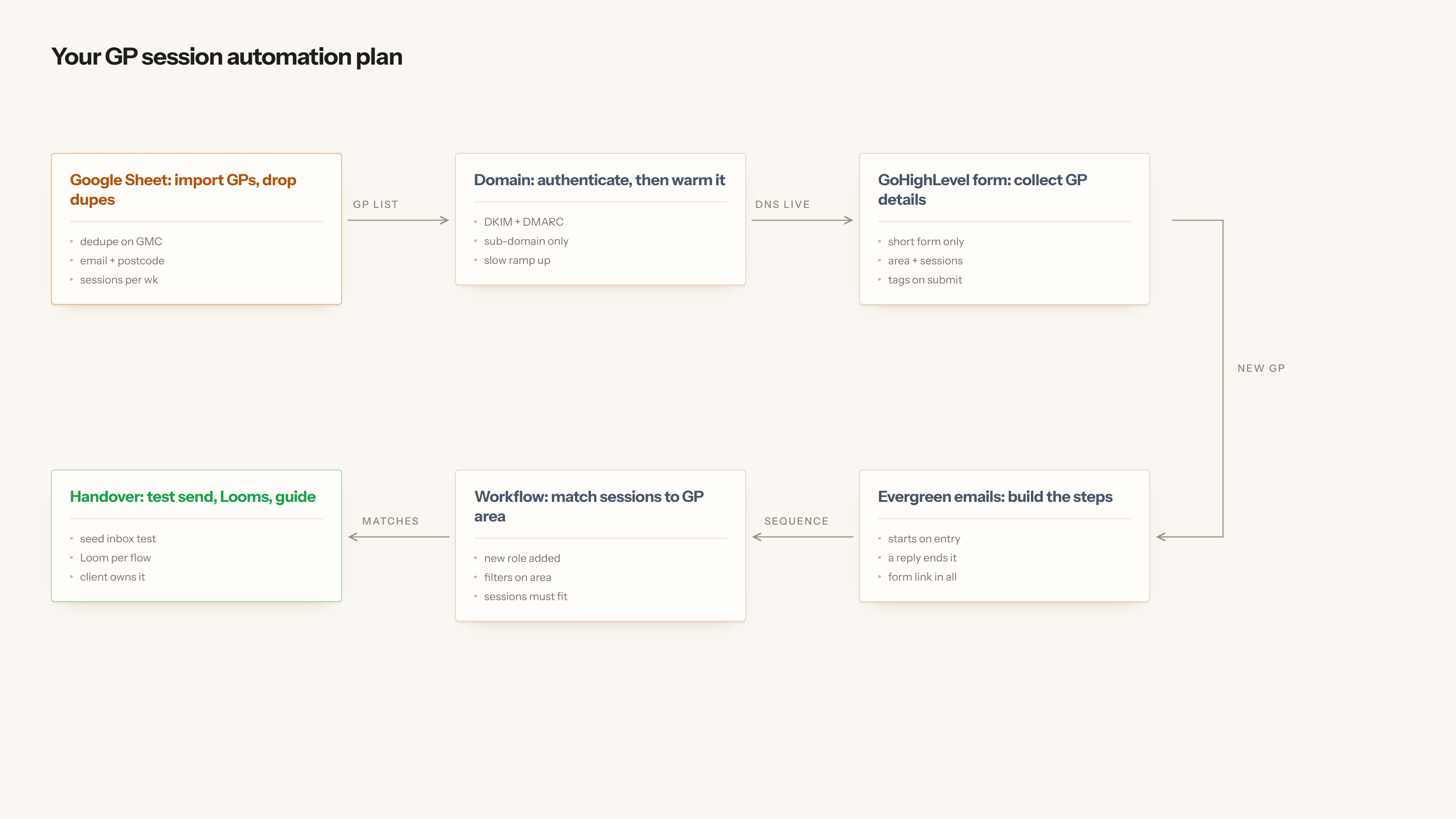
01Before a single email goes out
The list and the sending reputation come first. A GP list imported badly, or a domain that has never sent mail, is the difference between landing in an inbox and landing in spam.
- Import the GP list from your Google Sheet Mapped into GoHighLevel: name, email, mobile, home postcode, sessions per week, travel distance.
- Drop the duplicates on GMC number GMC number is the only truly unique field a GP has — emails and mobiles change, that does not. Anything that collides gets parked on a review tab rather than silently merged.
- Set up a sending sub-domain A sub-domain, so your main domain's reputation is never at risk. SPF, DKIM and DMARC published and verified before anything is scheduled.
- Warm it up Volume starts low and climbs over the warm-up window. Replies and opens on the early sends are what teach the mailbox providers that this domain is wanted.
- Run a delivery test A seeded test across Gmail, Outlook and NHS.net style filters, checked for inbox versus promotions versus spam, with the sequence copy adjusted before it goes live.
02Automation 1 — the form and the evergreen sequence
A short form, because a long one loses GPs. Seven fields, each one of which the matching automation later needs:
What the form asks
- Full name and GMC number — the identity and the dedupe key
- Email and mobile — how the desk reaches them
- Home postcode — the outward code is pulled out of this for area matching
- Sessions per week — how much work they actually want
- Travel distance in miles — how far out of their own area they will go
On submit the GP is created or updated in GoHighLevel, tagged with their area and the sessions they want, and dropped into the evergreen sequence. Evergreen means it runs off the date they joined, not a campaign date — a GP who registers today gets email one today, and a GP who registered in March is somewhere further down the same track.
How the sequence behaves
- Starts on entry, so there is no batch to schedule and no one to miss
- A reply ends it — the moment a GP writes back, the sequence stops and the desk takes over
- Every email carries the update link, so a GP changing from two sessions to four tells the system themselves
- Unsubscribes and bounces are honoured across both automations, not just the one that sent
03Automation 2 — matching sessions to GPs
This is the one that saves the desk its mornings. New sessions come in from the practices, and rather than a human reading down a list of GPs, the automation compares two things: is this session in an area the GP covers, and does the GP still have sessions free this week. Only the GPs who pass both get an email, and the email only contains their matches.
| GP | Area | Wants | Booked | Session offered | Match |
|---|---|---|---|---|---|
| Dr A. Okafor | LS | 4 | 1 | Beeston Hill, LS11 — Tue AM | Emailed |
| Dr H. Pattison | LS | 2 | 2 | Beeston Hill, LS11 — Tue AM | Skipped, week full |
| Dr R. Mensah | BD | 3 | 0 | Beeston Hill, LS11 — Tue AM | Skipped, wrong area |
| Dr R. Mensah | BD | 3 | 0 | Wibsey, BD6 — Thu PM | Emailed |
Example data, to show the rule. Names and sessions are made up.
04What is already standing up
The GP fields in GoHighLevel Built
Six contact fields are created and live in a GoHighLevel sub-account, which is what both automations read and write:
- GMC number — text, the dedupe key
- Sessions per week wanted — number
- Sessions booked this week — number
- Travel distance in miles — number
- Session preference — mornings, afternoons or either
- Home outward code — the LS6 part of the postcode, which is what the area match runs on
The matching logic, as a working flow Built
The same two automations are built out as an n8n workflow so the logic can be read step by step rather than taken on trust — the intake and dedupe on one line, the weekday matching run on the other. It is a specification you can see running, not a second system to maintain. In your account the same thing lives in GoHighLevel's own workflow builder.
05Handover
It is your account, your domain and your list throughout. I do not hold anything you would need to ask me for later.
- A written guide covering every workflow, what triggers it and what to change when your process moves
- Short Loom videos, one per automation, walking the actual screens rather than slides
- The DNS records you now own, written down, so a future provider change is not a mystery
- What to watch in the first fortnight — bounce rate, reply rate, and the duplicates tab